As an account owner, you can edit your account details. To do this, follow these steps:
- Log in to the Customer Portal.
If you do not know how to log in to the Customer Portal, please see this article.
- On the menu bar, click HELLO, NAME!, where NAME is your first name:

- Click :
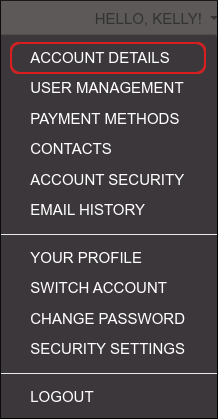
-
Fill out the fields with your contact information and other account details.
The Customer Portal uses your e-mail address to authenticate you when you log in. If you change your e-mail address on the Customer Portal, make sure you use the new e-mail address the next time you log in. Otherwise, you will not be able to access your account using the Customer Portal. - Click .
Editing your user profile
If you are logged in to the Customer Portal as a user (that is, as someone with permissions to access another account), you can edit your profile. The profile contains your name and email address.
For detailed information about how to invite and manage users in the Customer Portal, please see this article.
To do this, follow these steps:
- Log in to the Customer Portal.
If you do not know how to log in to the Customer Portal, please see this article.
- On the menu bar, click HELLO, NAME!, where NAME is your first name:
- Click :
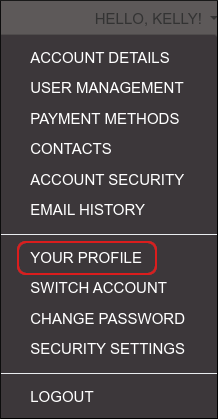
-
Update the fields with your name or email address:
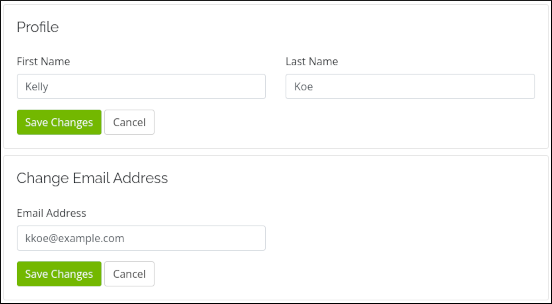
- Click .