Renewing a domain
To renew a domain that you previously purchased from Dollar OVPN, follow these steps:
- Log in to the Customer Portal.
If you do not know how to log in to the Customer Portal, please see this article.
- On the menu bar, click , and then click :
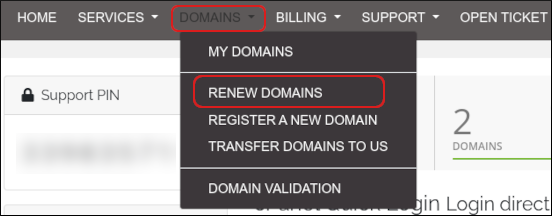
-
In the domain list, locate the domain that you want to renew:
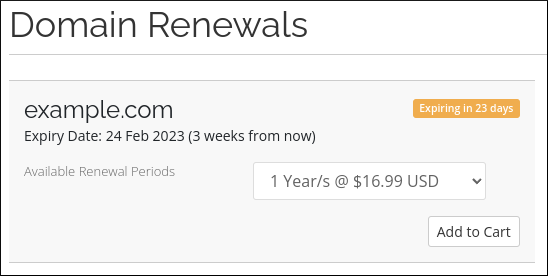
- Select the renewal length period in the list box.
- To complete the renewal and checkout process, click , click View Cart, and then click Checkout.
Configuring automatic renewal for a domain
For greater convenience, you can configure your domains for automatic renewal. When automatic renewal is enabled, A2 Hosting automatically sends you a renewal invoice three (3) days before the domain expires. This provides you with enough time to complete the renewal process before domain expiration.
To configure automatic renewal for a domain, follow these steps:
- Log in to the Customer Portal.
If you do not know how to log in to the Customer Portal, please see this article.
- On the menu bar, click , and then click :
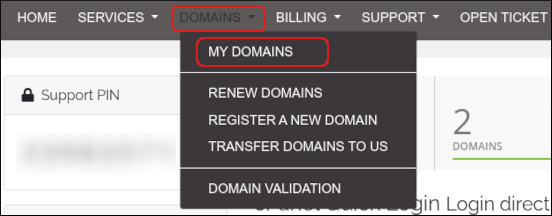
-
Select the check box next to the domain you want to configure:
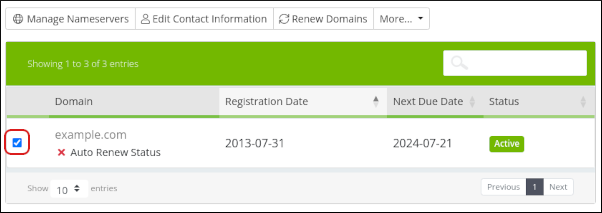
-
Click More, and then click Auto Renewal Status:
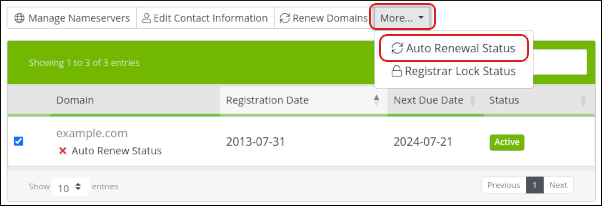
-
The renewal status for the domain appears:
- To enable automatic renewal, click .
- To disable automatic renewal, click .