To add a new contact for your account, follow these steps:
- Log in to the Customer Portal.
If you do not know how to log in to the Customer Portal, please see this article.
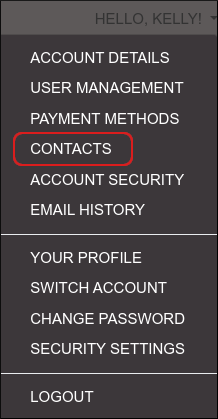
- On the menu bar, click HELLO, NAME!, where NAME is your first name:

- Click :
- In the Choose Contact list box, select Add New Contact, and then click Go.
- Fill out the fields with the contact's information.
- Under Email Preferences, select the types of e-mail messages that you want the contact to receive.
- Click .
Deleting a contact
To delete a contact, follow these steps:
- Log in to the Customer Portal.
If you do not know how to log in to the Customer Portal, please see this article.
- On the menu bar, click HELLO, NAME!, where NAME is your first name:
- Click :
- In the Choose Contact list box, select the contact you want to delete.
- Scroll to the bottom of the page, and then click .
- To confirm deletion, click .