Cancelling a product or service
You can cancel a product or service associated with your account at any time. Before you submit a cancellation request, please review our billing policy.
To cancel a product or service, follow these steps:
- Log in to the Customer Portal.
If you do not know how to log in to the Customer Portal, please see this article.
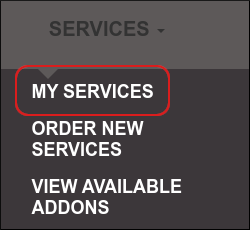
- On the menu bar, click and then click :
-
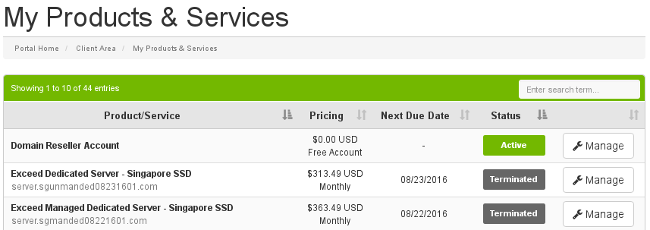
Under My Products & Services, locate the product or service you want to cancel, and then click :
-
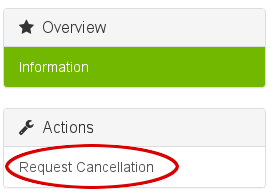
In the left sidebar, under, click :
- On the cancellation page, please provide a primary reason for canceling the product or service. You can add any additional comments in the text box.
-
In the Cancellation Type list box, select whether you want the cancellation to be immediate, or occur at the end of the billing period.
For cancellations at the end of the billing period, accounts are suspended for 14 days. During this 14-day grace period, if you change your mind you can reactivate your account with all of your data intact. At the end of the 14-day grace period, the account is terminated and all data is removed. - Select the I have read the above warnings and understand my data will be deleted when my cancellation request is processed check box.
- Click .
After cancellation
For immediate cancellations, Dollar OVPN does not retain any data after you cancel a product or service. Make sure you back up any data that you want to save before an immediate cancellation.
For cancellations at the end of the billing period, you have a subsequent 14-day grace period during which you can reactivate your account if you change your mind, or you can back up your data to a safe location. At the end of the 14-day grace period, the account is terminated and all data is removed.
Also, if you cancel a hosting account that uses Dollar OVPN for DNS, please note that you must update the DNS name server entries (and any additional custom DNS records you may have created).
A few words about cancellation
We value you as a customer!
Technical issues
If you are considering cancellation because of technical issues, we highly recommend that you open a ticket with Dollar OVPN Support before you submit a cancellation request. Our experienced support personnel can often provide a solution or suggest an alternative approach to any technical problem you may encounter. If you are dissatisfied with a response provided by technical support, please request an escalation, and we will double-check its accuracy.
Non-technical issues
If you are dissatisfied with any non-technical aspects of our services, we recommend that you contact Sales before you submit a cancellation request. We will do our best to address your concerns.
Suggestions
If you have comments, concerns, or suggestions that you would like to send directly to management, please open a ticket in the Customer Portal.