AutoSSL notifications are changed in the Contact Information area of cPanel. This article shows you how.
- Log in to cPanel.
If you do not know how to log in to your cPanel account, please see this article.
- Open the Contact Information tool:
- If you are using the Jupiter theme, on the Tools page, in the Preferences section, click Contact Information:
-
If you are using the Paper Lantern theme, in the PREFERENCES section of the cPanel home page, click Contact Information:

- If you are using the Jupiter theme, on the Tools page, in the Preferences section, click Contact Information:
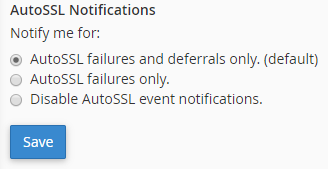
- On the Contact Information page, scroll down until the AutoSSL Notifications section appears.
-
Click the notification option that you want:
- Click .